When anglers search for fish finder not detecting fish how to troubleshoot, they often think the unit is broken. In many cases, the problem comes from a simple setting, loose cable, dirty transducer, or poor installation.
After working with marine electronics, I have learned that a fish finder is only as accurate as its setup. A properly adjusted sonar unit can help anglers across the United States find structure, depth changes, and fish activity in lakes, rivers, and coastal waters.

Common Reasons Your Fish Finder Is Not Detecting Fish
The first step in learning fish finder not detecting fish how to troubleshoot is finding the cause. Fish finders use sonar waves, so problems can happen with the signal, the hardware, or the settings.
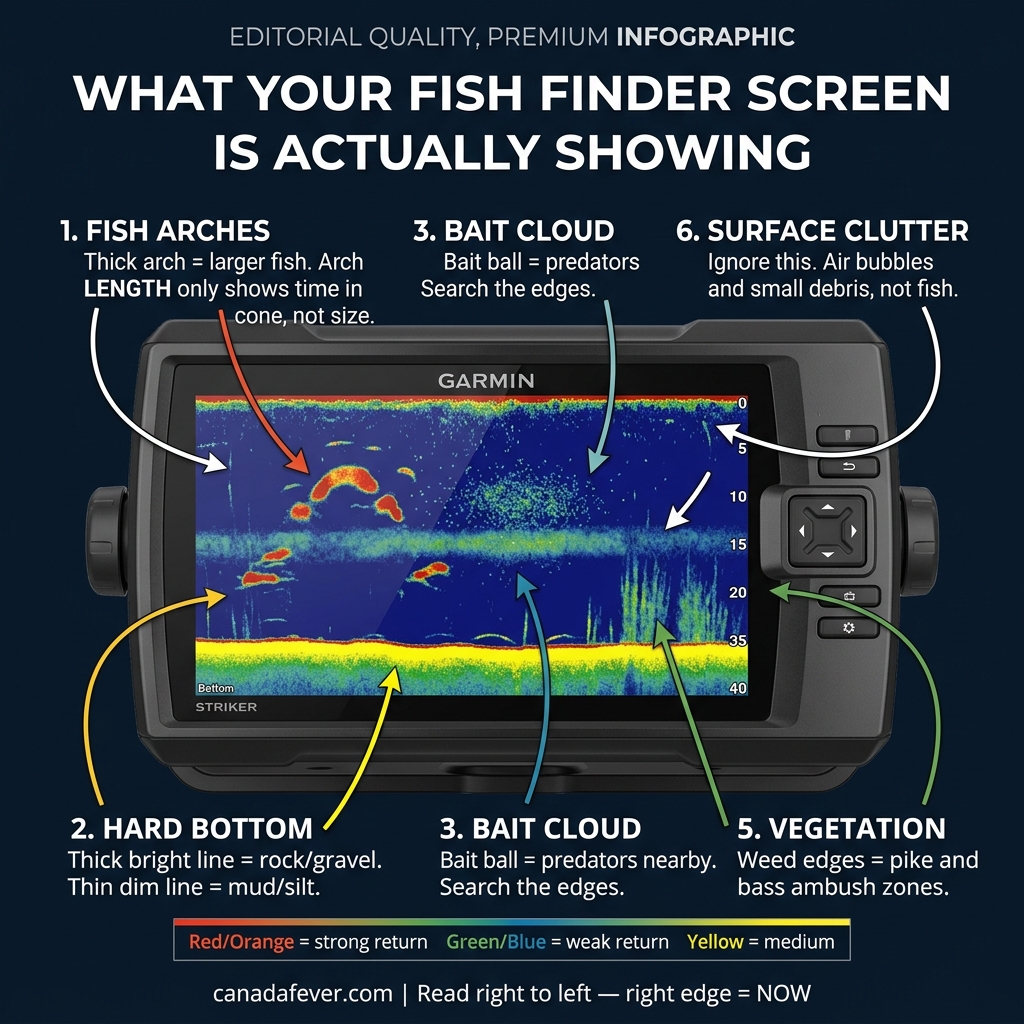
Many anglers expect to see fish icons all the time. However, fish may appear as arches, lines, or small marks depending on depth, speed, and sonar settings.
- ✦ Incorrect sonar settings
Low sensitivity, wrong frequency, or automatic settings can hide fish returns from the screen.
- ✦ Transducer problems
A damaged, dirty, or badly positioned transducer can stop sonar signals from reaching the water correctly.
- ✦ Power issues
Weak batteries or poor wiring can reduce sonar performance and cause missing readings.
Why fish icons may disappear
Fish symbols are not always reliable because they depend on software interpretation. Experienced anglers often learn to read raw sonar returns instead of depending only on icons.
- ✦ Use raw sonar view
The traditional sonar screen often shows more information than the fish ID feature.
Inspect and Fix the Transducer Installation
A transducer is the most important part to check when your fish finder is not detecting fish how to troubleshoot. It sends and receives sonar signals below your boat.
A small installation mistake can create weak readings. The transducer should sit correctly in the water and stay free from dirt, weeds, and damage.

- ✦ Check the mounting angle
Make sure the transducer points straight down and is not tilted away from the water.
- ✦ Clean the transducer surface
Remove algae, mud, and marine growth that can block sonar signals.
- ✦ Inspect the cable
Look for cuts, loose connections, or damage near the plug and mounting area.
Testing a transducer while on the water
A quick test is to compare depth readings at slow speed and higher speed. If readings fail only while moving, the transducer position may cause turbulence problems.
- ✦ Compare different speeds
A stable sonar image at low speed but poor readings at high speed often points to installation issues.
Check Power Supply and Electrical Connections
A fish finder needs stable power to send strong sonar pulses. If voltage drops, the screen may work while sonar performance becomes poor.
When researching fish finder not detecting fish how to troubleshoot, always check the battery and wiring before buying new equipment.

- ✦ Test battery voltage
A weak marine battery can reduce performance, especially during long fishing trips.
- ✦ Secure all connections
Loose plugs and corroded terminals can interrupt power to the sonar system.
Adjust Sonar Settings for Better Fish Detection
Incorrect settings are a common reason anglers ask how to troubleshoot a fish finder not detecting fish. Factory settings may not work well in every lake or depth.
Small adjustments to sensitivity, frequency, and range can improve the sonar picture without changing hardware.

- ✦ Increase sensitivity slowly
Raise sensitivity until you see useful details without filling the screen with noise.
- ✦ Choose the correct frequency
Higher frequencies work well in shallow water, while lower frequencies often reach deeper areas.
- ✦ Set the correct depth range
Manual depth settings can help when automatic mode misses important areas.
Understanding sonar noise
Noise can look like fish but may come from boat vibration, electrical interference, or rough water. Learning to separate noise from real targets improves confidence.
- ✦ Reduce clutter
Use noise rejection features carefully because high filtering can remove real targets.
Consider Water Conditions and Fishing Location
Sometimes the fish finder works correctly, but fish are not visible because of natural conditions. Fish may move away, stay close to the bottom, or hide in cover.
A good fish finder shows what is below the boat, not a guarantee that fish will always appear on the screen.
- ✦ Check water depth
Very shallow or very deep water may require different sonar settings.
- ✦ Look around structure
Fish often gather near drop-offs, vegetation, rocks, and underwater changes.
A Step-by-Step Troubleshooting Checklist
If you still need help with fish finder not detecting fish how to troubleshoot, follow a simple repair checklist. Start with easy fixes before replacing expensive parts.
This method saves time and helps identify whether the issue comes from setup, electronics, or normal fishing conditions.
- ✦ Step 1
Restart the unit and check for software updates.
- ✦ Step 2
Inspect power cables, plugs, and battery connections.
- ✦ Step 3
Clean and adjust the transducer.
- ✦ Step 4
Reset sonar settings and test different modes.
Frequently Asked Questions about fish finder not detecting fish how to troubleshoot

fishingscouty
Contributor