Knowing how to identify underwater vegetation on sonar helps anglers find fish habitat faster and spend less time searching empty water. In U.S. lakes, ponds, and reservoirs, grass beds often hold baitfish and game fish because plants provide food, shade, and cover.
After years of reading fish finders, one lesson stands out: vegetation rarely looks the same on every screen. Depth, water clarity, sonar frequency, boat speed, and plant type all change the picture. The best results come from learning patterns instead of memorizing one image.

understanding What Underwater Vegetation Looks Like on Sonar
To understand how to identify underwater vegetation on sonar, first learn how sonar displays objects. A fish finder sends sound waves into the water and shows how those waves return from the bottom, plants, fish, and structures.
Vegetation usually appears as a soft or uneven area that rises above the lake floor. Unlike a clean mud bottom, plant growth creates a rough texture because leaves, stems, and branches reflect sound in different ways.
- ✦ Plant height
Tall grass or weeds often appear as vertical growth extending upward from the bottom line.
- ✦ Plant density
Thick vegetation creates stronger and more filled-in sonar returns than scattered plants.
- ✦ Edge patterns
Vegetation edges often appear as sharp transitions between open bottom and covered areas.
Why Vegetation Creates Different Sonar Returns
Plants contain air spaces and surfaces that reflect sonar waves. This creates different signals compared with rocks, sand, or clay. The stronger the plant structure, the easier it becomes to recognize.
- ✦ Strong returns
Dense vegetation can create brighter or thicker sonar marks.
- ✦ Weak returns
Thin plants may blend into the bottom and require higher detail imaging.
Using Down Imaging to Find Grass Beds and Weeds
Down imaging gives a detailed view directly below the boat. It is one of the most useful tools when learning how to identify underwater vegetation on sonar because it creates a clearer picture of plant shapes.
A common sign of vegetation is a dark or textured bottom with sections that rise upward. Many anglers use down imaging to confirm whether a promising area contains grass before making repeated casts.
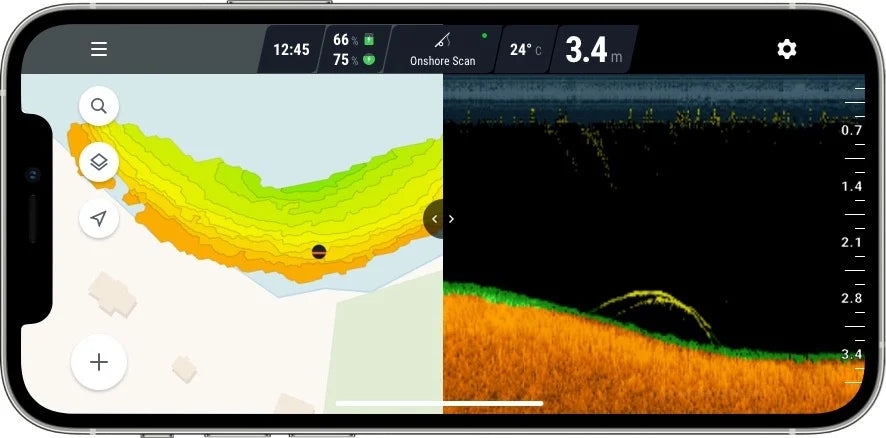
- ✦ Look for vertical shadows
Plants may create shadows that help show height and shape.
- ✦ Watch the bottom line
Vegetation often makes the bottom appear thicker or less smooth.
Best Settings for Vegetation Detection
Clear contrast and proper sensitivity settings make plants easier to see. Avoid extreme settings that create too much noise because false marks can look like weeds.
- ✦ Adjust sensitivity
Increase sensitivity slowly until plants become visible without creating clutter.
- ✦ Choose proper frequency
Higher frequencies often show more detail in shallow water.
Using Side Imaging to Locate Large Vegetation Areas
Side imaging is helpful when searching wide areas because it scans the water on both sides of the boat. It can reveal long grass lines, weed flats, and vegetation edges that are difficult to find with traditional sonar.
When learning how to identify underwater vegetation on sonar, side imaging helps you understand the shape of the habitat. A large plant bed may appear as a long textured section beside the boat path.

- ✦ Scan open water
Side imaging helps cover more area while looking for hidden plant zones.
- ✦ Mark vegetation edges
Fish often hold where plants meet open water.
Finding Productive Vegetation Boundaries
The outside edge of vegetation is often more valuable than the center. Bass, crappie, and other species may patrol these borders because they provide both cover and access to open water.
- ✦ Grass lines
Look for clear borders between plant growth and bare bottom.
- ✦ Channels
Submerged channels through vegetation can attract feeding fish.
How to Tell Vegetation Apart from Rocks and Other Structure
A common challenge with sonar is confusing plants with rocks, brush, or uneven terrain. Learning how to identify underwater vegetation on sonar requires comparing shape, texture, and location.
Rocks usually create hard, bright returns with clear edges. Vegetation often looks softer and shows growth patterns that extend above the bottom.

- ✦ Rock signals
Hard objects usually create stronger returns and sharper shadows.
- ✦ Vegetation signals
Plants often appear irregular, soft, and connected to the bottom.
Common Mistakes New Sonar Users Make
Many beginners assume every tall mark is a fish-holding weed bed. The best approach is to confirm vegetation by changing direction, adjusting settings, and scanning the area again.
- ✦ Ignoring depth changes
Plant growth often changes with depth and season.
- ✦ Using one sonar view
Combining traditional sonar with imaging creates better confirmation.
Factors That Affect Vegetation Detection on Sonar
Sonar images change because underwater conditions are always moving. Water depth, plant season, boat speed, and sonar settings can all affect what appears on your screen.
Understanding these factors improves your ability to identify underwater vegetation on sonar in different fishing environments across the United States.
- ✦ Water depth
Deep water may reduce detail and make small plants harder to see.
- ✦ Plant season
Vegetation changes throughout the year as plants grow and die back.
- ✦ Boat speed
A steady speed helps produce clearer sonar images.
Why Practice Improves Sonar Skills
Reading sonar is a skill built through repetition. Save screenshots, compare locations, and match sonar images with what you find below the surface.
- ✦ Save discoveries
Recording successful spots helps build personal sonar knowledge.